Architecture Documentation with arc42
This guide demonstrates how to document software architecture using the arc42 template combined with Sphinx-Needs directives. This approach enables systematic architecture documentation with full traceability between architecture decisions, components, and requirements.
What is arc42?
arc42 is a proven, practical, and pragmatic template for software architecture documentation and communication. It provides a standardized structure with 12 sections covering all aspects of software architecture.
Why Combine arc42 with Sphinx-Needs?
By integrating arc42 with Sphinx-Needs, you gain:
Traceability: Link architecture elements to requirements, design decisions, and test cases
Filtering: Query and display specific architecture elements based on criteria
Consistency: Ensure all architecture components are properly documented
Navigation: Automatic cross-references between related architecture elements
Reporting: Generate architecture overviews, dependency matrices, and more
arc42 Structure Overview
The arc42 template consists of 12 sections:
Introduction and Goals
Constraints
Context and Scope
Solution Strategy
Building Block View
Runtime View
Deployment View
Crosscutting Concepts
Architecture Decisions
Quality Requirements
Risks and Technical Debt
Glossary
Custom Sphinx-Needs Types for arc42
Define custom need types in your conf.py to represent arc42 elements:
needs_types = [
    # ... existing types
    {
        "directive": "arch-goal",
        "title": "Architecture Goal",
        "prefix": "AG_",
        "color": "#BFD8D2",
        "style": "node"
    },
    {
        "directive": "constraint",
        "title": "Constraint",
        "prefix": "CON_",
        "color": "#FEDCD2",
        "style": "node"
    },
    {
        "directive": "building-block",
        "title": "Building Block",
        "prefix": "BB_",
        "color": "#DF744A",
        "style": "node"
    },
    {
        "directive": "arch-decision",
        "title": "Architecture Decision",
        "prefix": "ADR_",
        "color": "#DCB239",
        "style": "node"
    },
    {
        "directive": "quality-goal",
        "title": "Quality Goal",
        "prefix": "QG_",
        "color": "#BFD8D2",
        "style": "node"
    },
]
Section 1: Introduction and Goals
Quality Goals
status: open
tags: performance, quality
links incoming: ARCH_CTX_001, ADR_001, ADR_002, QS_001, ARCH_QA_001
|
The system must handle 10,000 concurrent users with response times under 200ms for 95% of requests. |
status: open
tags: maintainability, quality
links incoming: ARCH_CTX_001, ADR_001, ARCH_QA_001
|
Code must follow clean architecture principles to ensure long-term maintainability and testability. |
status: open
tags: security, quality
links incoming: ARCH_CTX_001, CROSS_002, ARCH_QA_001
|
All data transmission must be encrypted, and authentication must use industry-standard protocols (OAuth 2.0, JWT). |
Stakeholders
tags: stakeholder
|
Expectations: Feature completeness, time-to-market, ROI Influence: High - Sets priorities and acceptance criteria |
tags: stakeholder
|
Expectations: Clear requirements, technical feasibility, maintainable codebase Influence: High - Implements and maintains the system |
Section 2: Constraints
Technical Constraints
status: accepted
tags: technical, language
links incoming: BB_004
|
The system must be implemented in Python 3.12+ to leverage existing team expertise and tooling. |
status: accepted
tags: technical, infrastructure
links incoming: ARCH_DV_001
|
Deployment must use AWS services due to existing enterprise agreement and compliance requirements. |
Organizational Constraints
status: accepted
tags: organizational
links incoming: ADR_001
|
Development team is limited to 5 developers, requiring architecture that minimizes coordination overhead. |
status: accepted
tags: organizational, budget
|
Infrastructure costs must not exceed $5,000/month in production. |
Section 3: Context and Scope
Business Context
External interfaces and system boundaries:
|
![@startuml
!define RECTANGLE class
actor User
actor Admin
rectangle "EAC System" {
component [API Gateway] as API
component [Documentation Engine] as DocEngine
component [Build System] as Build
}
database "Document Store" as DB
cloud "External Systems" {
component [Version Control] as VCS
component [CI/CD] as CICD
}
User --> API : Browse/Search Docs
Admin --> API : Manage Content
API --> DocEngine : Process Requests
DocEngine --> Build : Generate Docs
Build --> DB : Store Artifacts
DocEngine <--> VCS : Fetch Sources
Build <--> CICD : Trigger Builds
@enduml](../../_images/plantuml-205d9e530e13e268e989b258a3cec5a8110e4e01.svg)
Technical Context
Integration points with external systems:
|
Section 4: Solution Strategy
Context: Need to scale different components independently while maintaining team autonomy. Decision: Adopt microservices architecture with domain-driven design. Consequences:
|
Context: Microservices need to communicate without tight coupling. Decision: Use event-driven architecture with Redis Streams for inter-service communication. Consequences:
|
Section 5: Building Block View
Level 1: System Overview
links outgoing: ARCH_CTX_001
|
Top-level system components:
|
Level 2: Component Details
links incoming: ARCH_BB_001, ARCH_DV_001
|
Responsibilities:
Technologies:
|
links incoming: BB_004, ARCH_BB_001, ARCH_RV_001, ARCH_DV_001
|
Responsibilities:
Technologies:
|
links incoming: ARCH_BB_001, ARCH_RV_001, ARCH_DV_001
|
Responsibilities:
Technologies:
|
Component Relationships
        graph TD
   User[User/Client] -->|HTTPS| AG[API Gateway]
   AG -->|REST| DS[Documentation Service]
   AG -->|REST| SS[Search Service]
   DS -->|Events| BS[Build Service]
   DS -->|Read/Write| DB[(PostgreSQL)]
   BS -->|Store| S3[S3 Storage]
   BS -->|Index| SS
   BS -->|Clone| Git[Git Repository]

   style AG fill:#BFD8D2
   style DS fill:#DF744A
   style BS fill:#DF744A
   style SS fill:#DF744A
|
Section 6: Runtime View
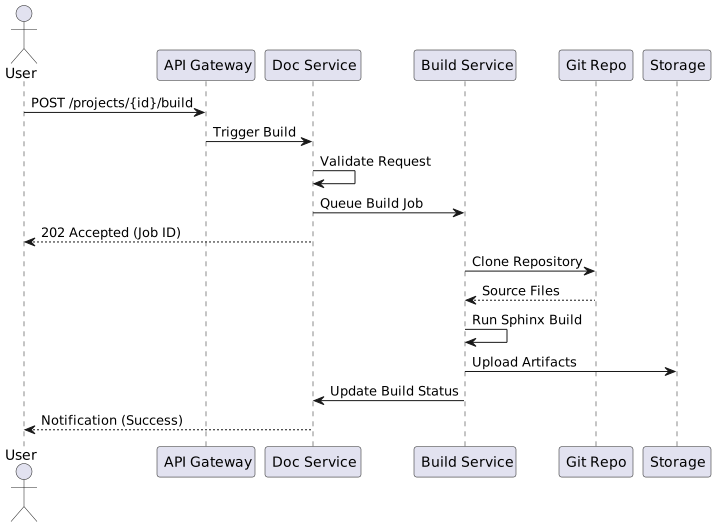
Sequence of events when a documentation build is triggered:
|
How search requests are processed:
        sequenceDiagram
   participant U as User
   participant AG as API Gateway
   participant SS as Search Service
   participant ES as Elasticsearch
   participant Cache as Redis Cache

   U->>AG: GET /search?q=architecture
   AG->>Cache: Check Cache
   alt Cache Hit
      Cache-->>AG: Cached Results
      AG-->>U: Return Results (Fast)
   else Cache Miss
      AG->>SS: Forward Query
      SS->>ES: Execute Search
      ES-->>SS: Results
      SS->>Cache: Store in Cache
      SS-->>AG: Results
      AG-->>U: Return Results
   end
|
Section 7: Deployment View
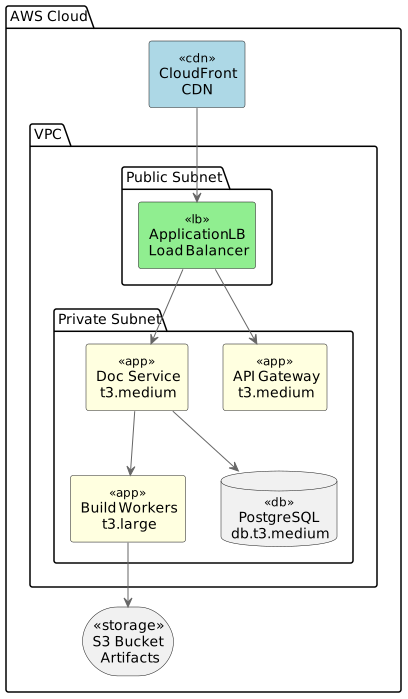
AWS infrastructure layout:
|
Section 8: Crosscutting Concepts
Logging and Monitoring
tags: logging, monitoring
|
All services use structured JSON logging with:
|
Security Concepts
Error Handling
tags: error-handling
|
Consistent error responses across all services: {
"error": {
"code": "BUILD_FAILED",
"message": "Documentation build failed",
"details": "Sphinx error: ...",
"timestamp": "2025-11-12T10:30:00Z",
"trace_id": "abc123"
}
}
|
Section 9: Architecture Decisions
Decision Records
All major architecture decisions are documented using the ADR format shown above. Key decisions include:
Section 10: Quality Requirements
Quality Scenarios
links outgoing: QG_001
|
Scenario: 1000 users simultaneously request documentation pages Expected Response:
|
Scenario: Single service instance fails Expected Response:
|
Quality Tree
        graph TD
   Q[Quality Goals] --> P[Performance]
   Q --> M[Maintainability]
   Q --> S[Security]

   P --> P1[Response Time < 200ms]
   P --> P2[Throughput > 10k req/s]

   M --> M1[Test Coverage > 80%]
   M --> M2[Clear Architecture]

   S --> S1[Encryption at Rest]
   S --> S2[Secure Authentication]
|
Section 11: Risks and Technical Debt
status: open
tags: risk, scaling
|
Risk: Build service may not scale to handle peak loads Probability: Medium Impact: High - Could cause build delays Mitigation:
|
status: open
tags: technical-debt
|
Description: Some API endpoints use deprecated patterns Impact: Inconsistent API design, harder to maintain Planned Resolution: Q2 2026 - API v2 migration |
Section 12: Glossary
tags: glossary
|
A compiled output from the documentation build process, typically HTML, PDF, or other formats. |
tags: glossary
|
An asynchronous task that processes documentation sources and generates artifacts. |
tags: glossary
|
A reStructuredText directive that creates traceable documentation elements (requirements, specs, etc.). |
Traceability Views
Architecture to Requirements
Show which architecture components fulfill which quality goals:
ID |
Title |
Links |
|---|---|---|
Use Microservices Architecture |
||
Event-Driven Communication |
||
Component Interaction |
||
EAC Documentation System |
||
API Gateway |
||
Documentation Service |
||
Build Service |
Complete Architecture Overview
Visualize all architecture elements and their relationships:
No needs passed the filters
Summary
This approach combines the proven arc42 template with Sphinx-Needs’ traceability features to create:
✅ Structured Documentation: Follow industry-standard architecture documentation template
✅ Full Traceability: Link architecture decisions to requirements, components, and quality goals
✅ Living Documentation: Keep architecture docs synchronized with implementation
✅ Automated Reporting: Generate views, matrices, and reports from architecture data
✅ Version Controlled: All architecture documentation in Git alongside code
Best Practices
Start Simple: Don’t fill all 12 sections at once. Focus on what’s important for your project.
Keep It Updated: Review and update architecture docs with each sprint/iteration.
Use IDs Consistently: Follow ID prefix conventions
Link Liberally: Connect related architecture elements using the
:links:option.Visualize: Use diagrams (PlantUML, Mermaid, Draw.io) to illustrate concepts.
Review Together: Make architecture reviews part of your regular process.
Additional Resources
C4 Model - Complementary architecture visualization approach